You know how much you sell. Find out why not more.

Quomerce reads how customers behave and helps you find what makes buying harder: problems on the way to an order, errors on the page and places worth improving. All in one place, and you can also analyse your shop’s data in Claude.

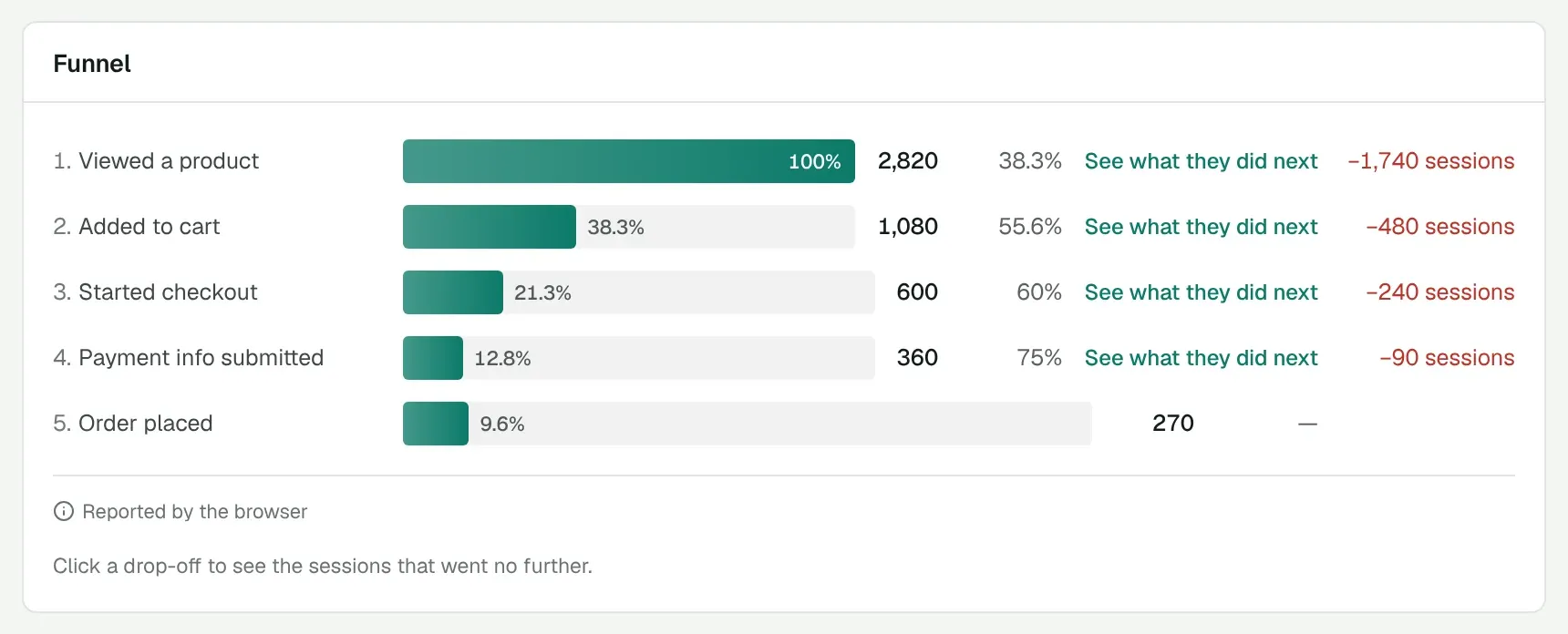
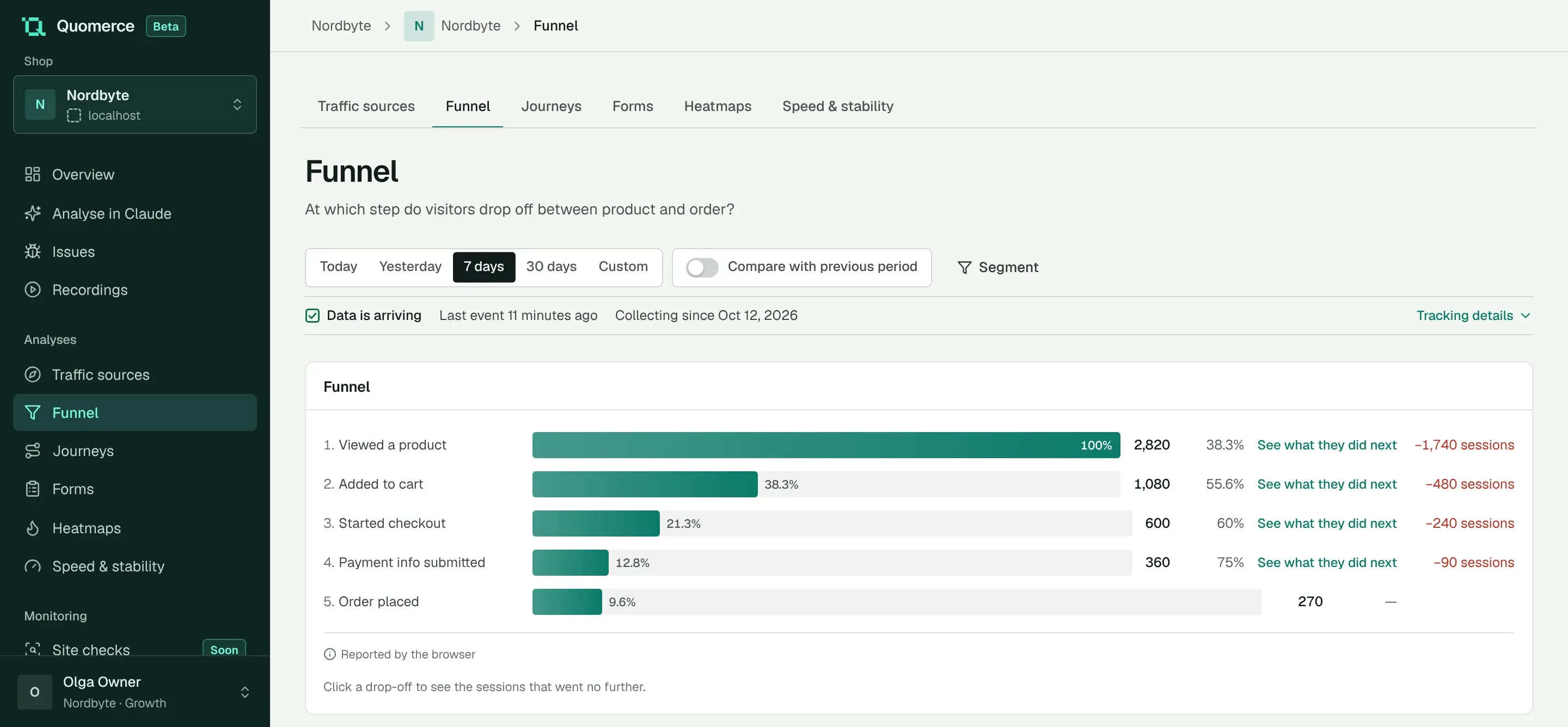
The funnel in Quomerce: how many sessions viewed a product, added to cart, started checkout, entered payment details and ordered, with the sessions lost at each step
The real funnel view in Quomerce, Nordbyte demo shop, sample data. Tap the screenshot to enlarge it.
  1. There is traffic

    Products get viewed

  2. Most people leave here

    Between product and cart

  3. And then?

    See what those customers did

You have data. But do you know what to do with it?

Each of your tools tells the truth about one part of the shop. Turning them into a plan of what to fix first is still up to you, and there is rarely time for it.

  • Google Analytics Traffic, sources and conversion
  • Recordings and click maps Sessions, clicks, scrolling
  • Shop admin Orders, revenue, carts

What should I improve in my shop?

How Quomerce helps you get to an answer

  1. Data

    Sessions, steps to an order, clicks, errors and orders in one place.

    Quomerce
  2. Observation

    Customers open several processors from the list and come back within seconds.

    Quomerce
  3. Hypothesis

    The list does not show how the models differ, so customers look for it themselves.

    You + Claude
  4. Recommendation

    Show the key specs on the list and compare the figures after two weeks.

    You

Quomerce can work next to these tools. It does not replace them; it suggests where to start.

See what is happening in your shop

The four views you will use most. Every screenshot comes from the working app.

What customers do on the way to an order

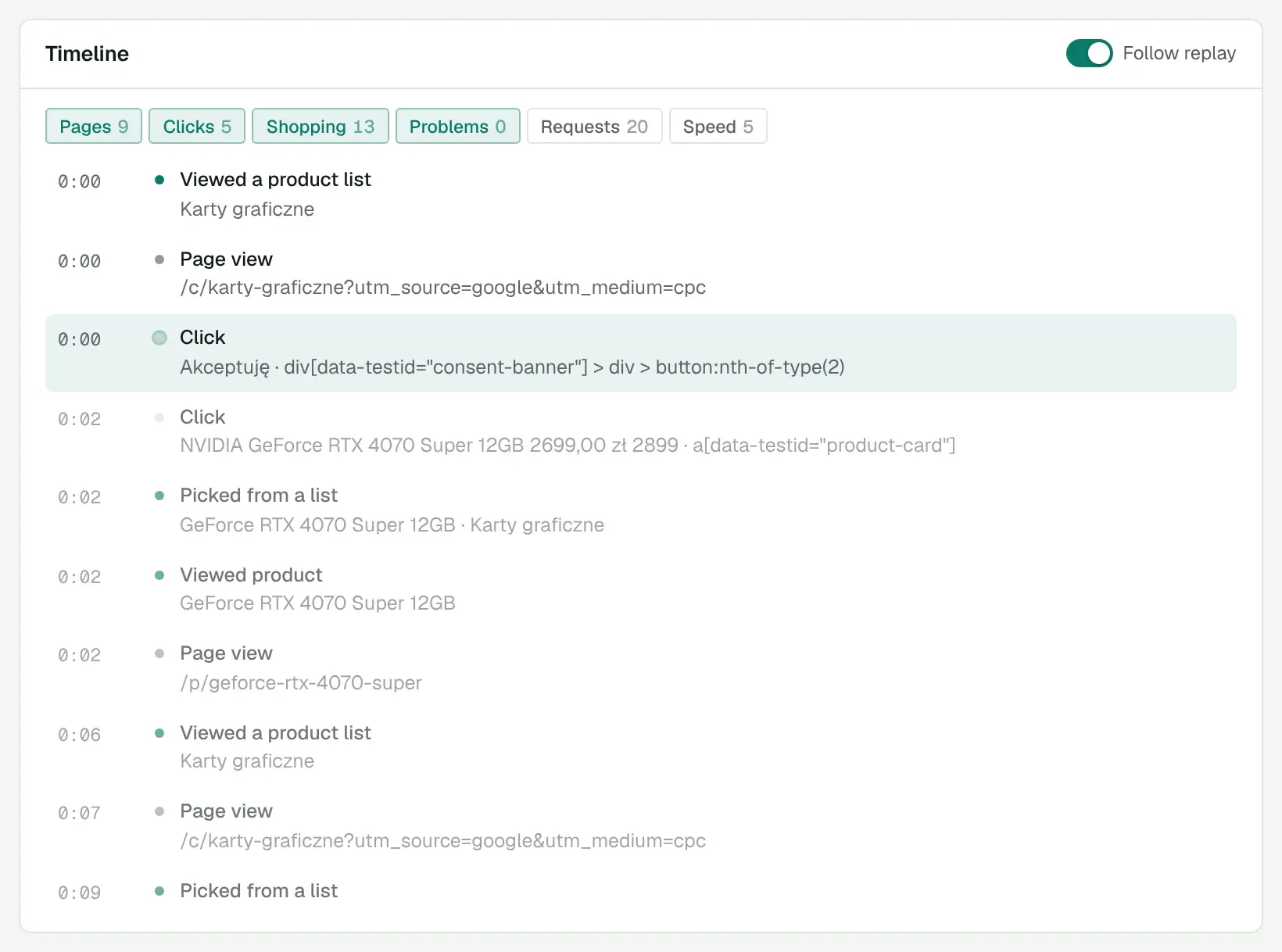
The funnel shows the step where customers drop off. Paths show where they went next: from the cart to checkout, back to products, or nowhere. Every visit has its recording and timeline.

  • Funnel from product to order
  • Paths after product, cart and checkout
  • Session recordings with a timeline

Why it helps: you know where to look before you watch the first recording.
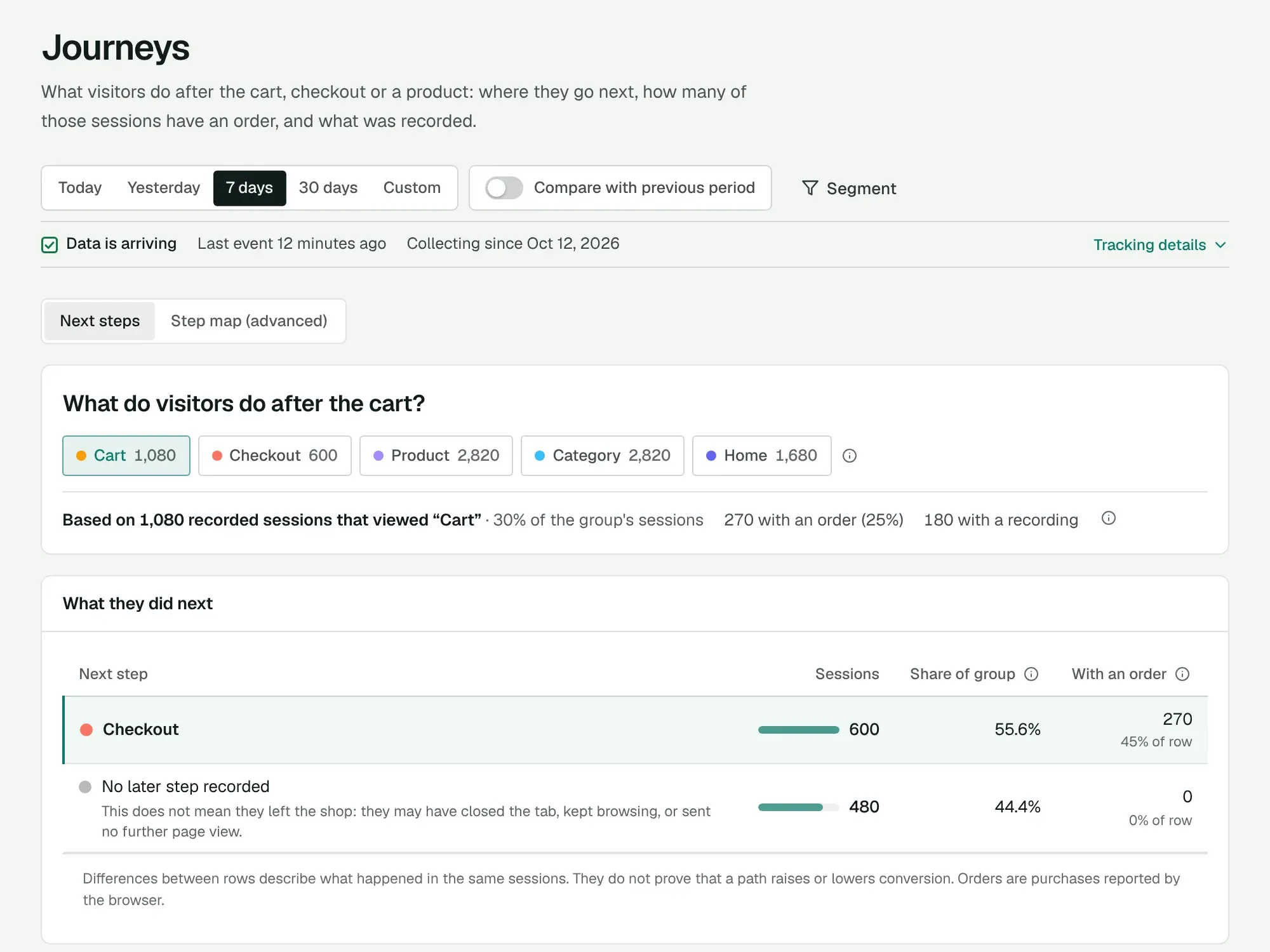
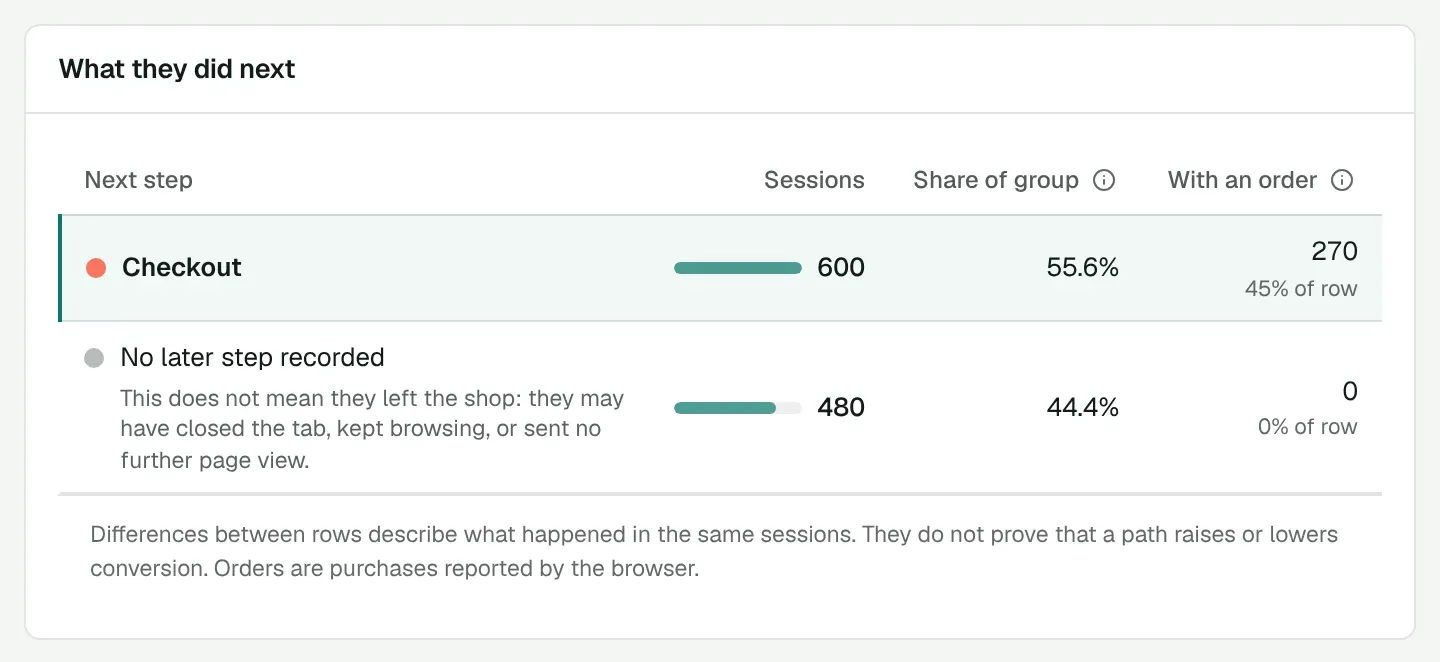
Paths in Quomerce: what customers do after the cart, how many sessions went to checkout, how many of them ordered, example recordings

Behaviour worth checking

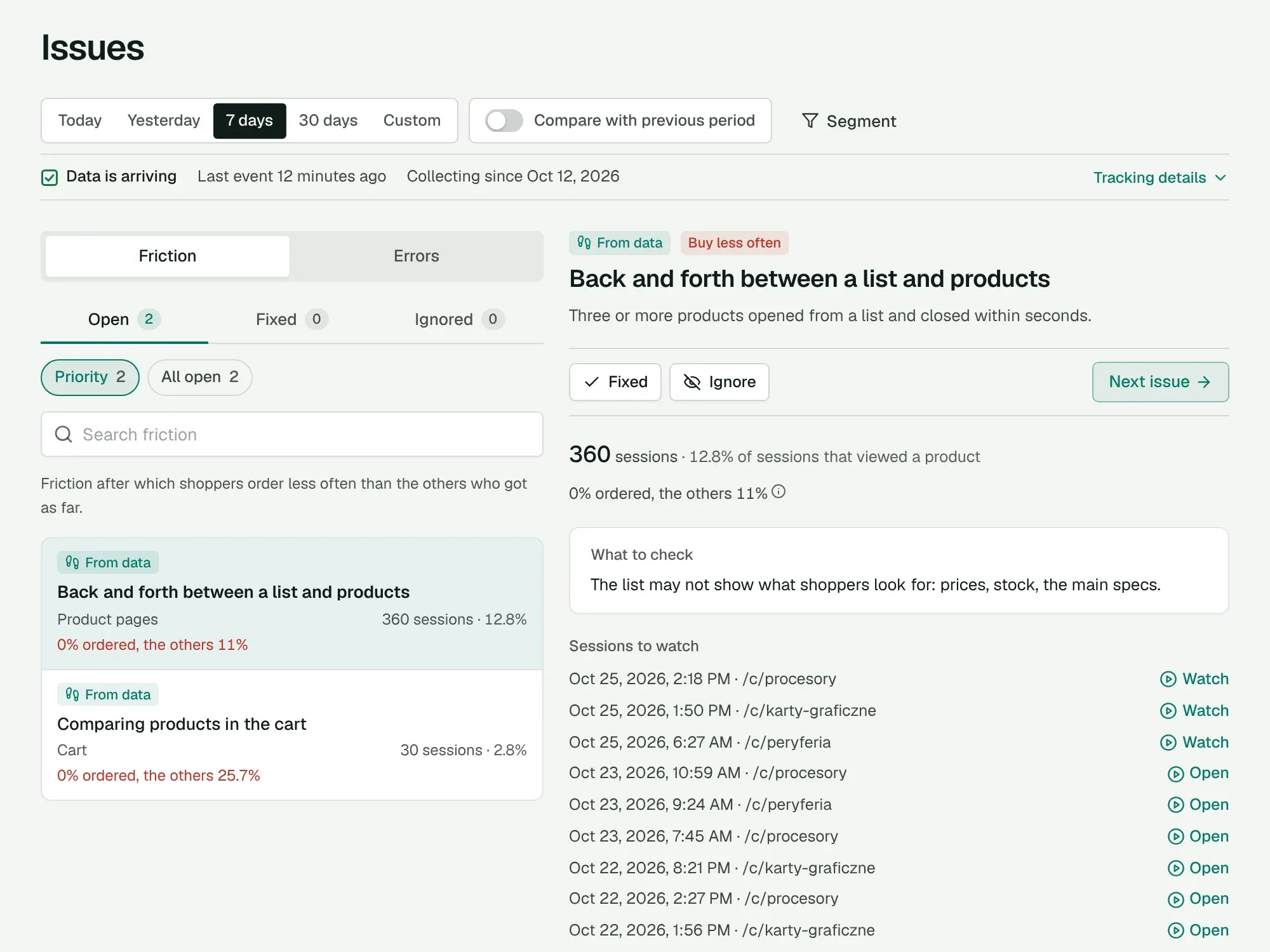
Quomerce goes through every session and looks for behaviour that often comes with giving up: going back and forth between list and product, similar products compared in the cart, several payment attempts, a long pause at a checkout field. Next to it are technical errors, such as a button that does nothing.

  • Session counts compared with other customers
  • Recordings for every problem
  • A hint on what to check

To be fair: a behaviour alone does not prove a problem. Quomerce shows how many sessions it affects and whether they end in an order less often. That is where your checking starts.

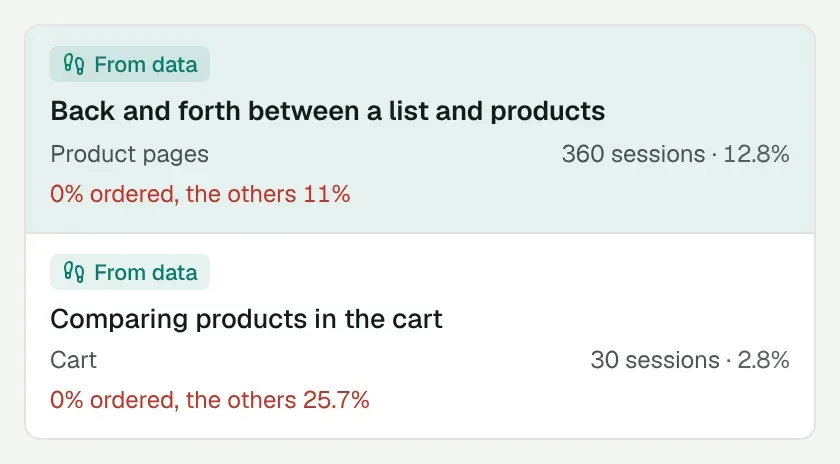
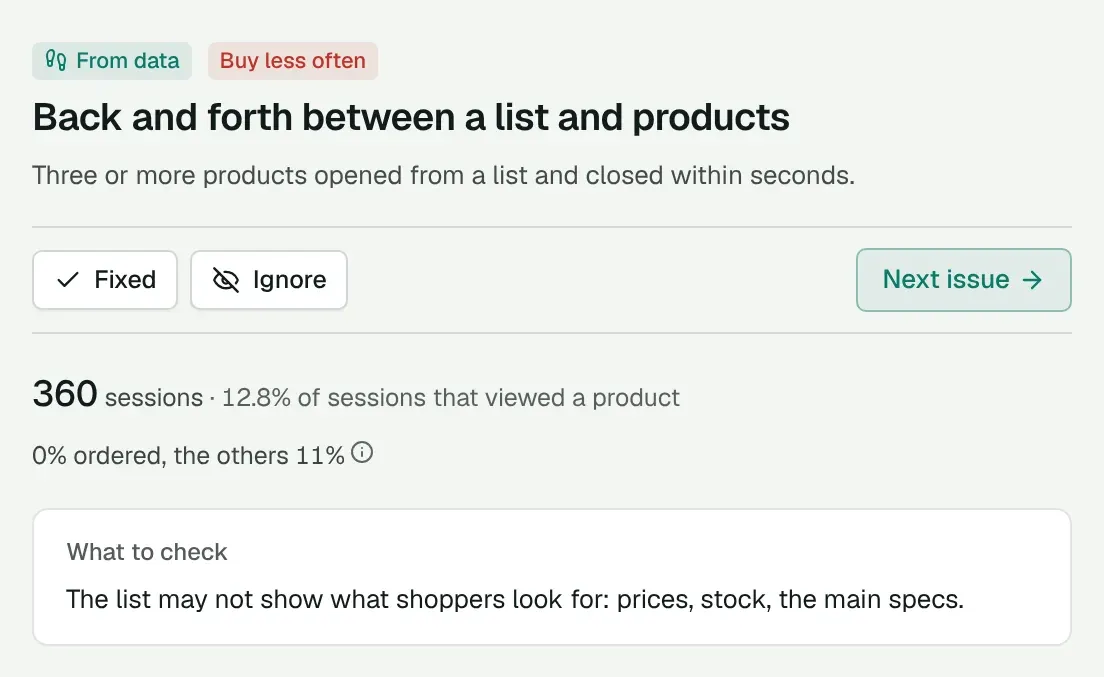
The friction list with “Back and forth between a list and products”: session count, order comparison and a hint on what to check

A UX audit without doing it yourself

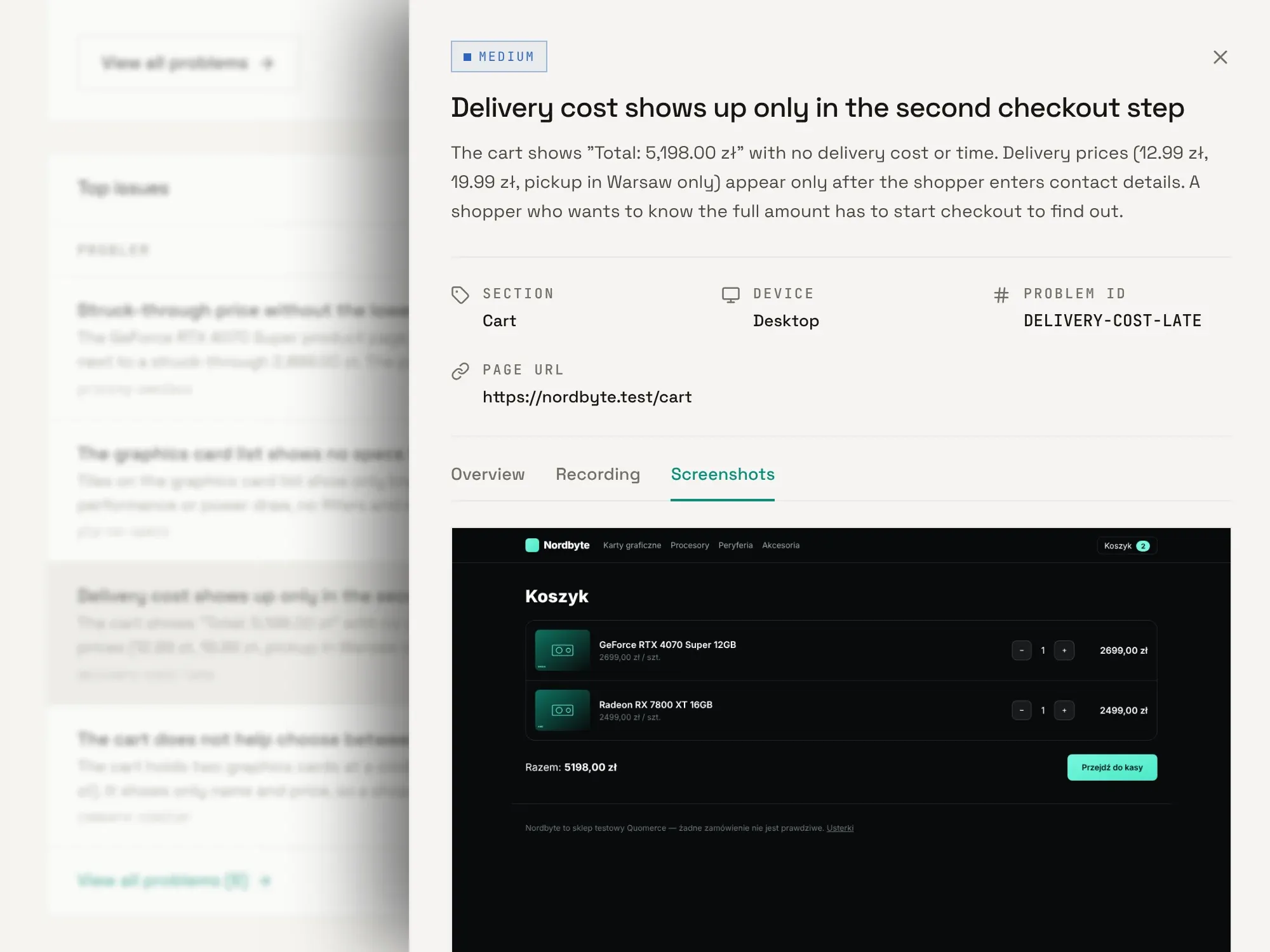
An AI agent goes through the shop like a customer: home page, product list, product page, cart, checkout. Every problem has a description, a priority, a screenshot and a suggested fix.

  • Priorities from critical to low
  • A screenshot with every problem
  • Report in English, Polish or German

Why it helps: you learn what may make buying harder without running a full UX audit yourself. We run the audit, and you get a link to the report.

A UX audit report: the problem “Delivery cost shows up only in the second checkout step” with a screenshot of the cart

Ask about your shop in plain words

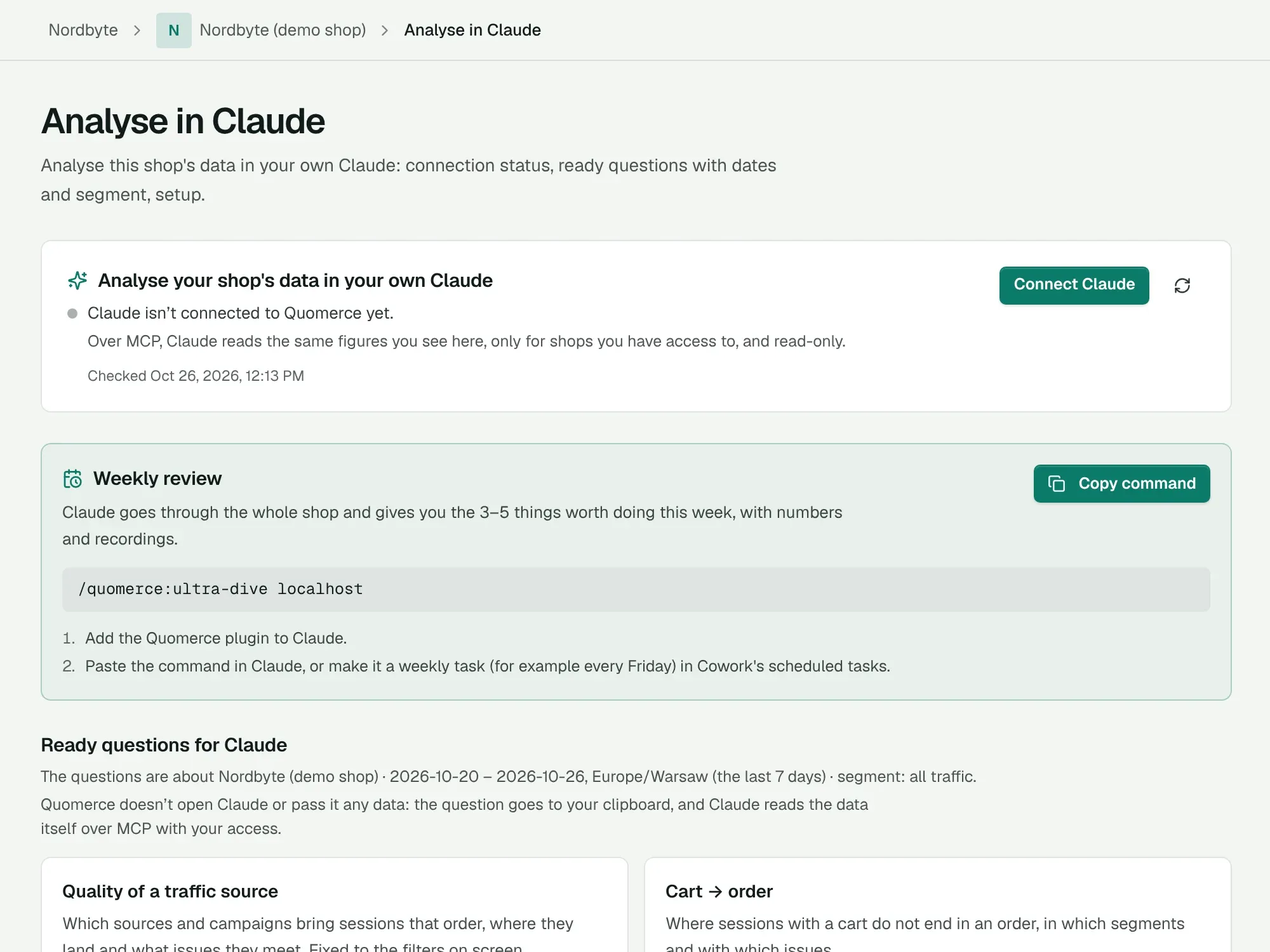
You connect Quomerce to your own Claude and ask the way you would ask an analyst. Claude reads the same data you see in the app: sessions, the funnel, paths, friction, errors and traffic sources. Read-only.

  • Ready questions in the app
  • Weekly review with one command
  • Read-only access

Why it helps: you do not need to know where to click or how to count something. Quomerce has ready questions to copy.

The “Analyse in Claude” page: connection status, weekly review and ready questions for Claude

Example questions

  • What may have made buying hardest in the last 7 days?
  • Which problems came up most often on product pages?
  • Which parts of the way to an order deserve a closer look?
  • Which three improvements should I consider first?

This is an illustration. Claude’s answer depends on the shop’s data.

The app also has

  • Traffic sources
  • Forms
  • Heatmaps
  • Customers stuck at payment
  • Page speed
  • Uptime monitoring
  • E-mail and Slack alerts
GoblinPC logo goblinpc.pl

From a customer’s behaviour to a concrete action

GoblinPC sells computers, including ones built in a configurator. Customers take a long time to choose, and the builds differ in details. This is how the data turned into a decision.

PLN 80,000 recovered by GoblinPC in 30 days

Honest about results

Quomerce cannot read a customer’s mind and does not count every cart without an order as a loss. It shows the behaviour, how many people it affects and what is worth checking. The decision is yours.

Figure from GoblinPC for 27 Sep – 26 Oct 2026, shown with the shop’s permission. The app views come from the Nordbyte demo shop, so GoblinPC’s data stays private.

Talk to your shop

You do not need to be an analyst to start asking better questions about your shop.

Claude
You

Check what customers struggled with most last week.

  • Reading friction, last 7 days
  • Reading the funnel
  • Reading what customers do after the cart
Claude

Three things stand out last week:

  1. “Back and forth between a list and products”: 360 sessions, 13% of the people who viewed a product. None of them ended in an order; among the others, 11% ordered.
  2. Most people leave between product and cart: 38% of the sessions that viewed a product added something to the cart.
  3. After the cart, 44% of sessions (480) open no further page. I cannot tell whether they left the shop, but a few of those recordings are worth watching.

I would start with the product list: that is where most sessions are. Shall I pick 5 recordings to watch?

An example written from the Nordbyte demo shop’s data. Claude’s real answer depends on your shop’s data and may look different.

The same data in Quomerce

Friction
The friction list in Quomerce with session counts and an order comparison
Funnel
The funnel in Quomerce from product view to order
After the cart
Paths in Quomerce: what customers do after the cart

In the Quomerce app

Works as soon as it is installed. Funnel, paths, friction, errors, recordings, audit reports and alerts. Plus ready questions for Claude, to copy.

In your own Claude

You need a Claude account and a one-time connection to Quomerce, which we help with. You ask in your own words and can combine shop data with other sources. Claude reads sessions, the funnel, paths, friction, errors and traffic sources, read-only. Audit reports you read in the app.

Technically, Quomerce shares the data over MCP, an open standard Claude uses to connect to other services.

Less searching. More doing.

For shops where analysis gets an hour a week, if that.

  1. Watch every session

    Start from the few recordings that show something

    Quomerce picks out the behaviour and places that need attention, and leads you to the recordings that show them.

  2. Run every audit yourself

    Get a list of things to check

    The UX audit points to problems worth checking, each with a description, a priority and a screenshot.

  3. Interpret every number yourself

    Ask about your shop in plain sentences

    Claude reads the figures in Quomerce and tells you what changed and where to look.

How is Quomerce different from standard analytics?

GA4, Clarity and Hotjar do their jobs well, and they have AI features too. Quomerce does not have to replace them. It is built around the shop: product, cart, checkout and order.

A typical set of tools With Quomerce
Start You start from reports and recordings and look for the problem yourself. You start from a list of friction and errors, counted across sessions.
Shop language You often set up the funnel and shop events separately. Quomerce understands product, cart, checkout, payment and order.
UX audit A UX audit is a separate project. The UX audit is part of the product.
AI The AI assistant works the way the tool’s maker designed it. You work in your own Claude: shop data and other sources in one chat.
Result You put findings and a plan together from several places. The observation, recordings and what to check sit in one place.

Who is Quomerce for?

For one shop, however many people work on it.

You run the shop alone

Less time searching, more time fixing

You handle everything at once: products, marketing, customers. Quomerce shows where to look this week, so you do not have to dig through reports.

  • A weekly review and a few recordings
  • An e-mail alert when a new error appears
  • A question to Claude instead of a spreadsheet

You have an e-commerce team

Hypotheses and priorities backed by data

Marketing, an e-commerce manager, a developer: everyone sees the same data. A problem with a session count and a recording is a good start for a plan of tests and changes.

  • Access for the team: owner, manager, view only
  • A link to a view with the same dates and filter
  • A recording of the exact problem for your developer

You work with an agency

Talk to your agency about the same numbers

You invite your agency to your shop in Quomerce. The agency sees only this shop, and findings and recordings turn more easily into one shared list of priorities.

Quomerce for agencies →
  • An invite link, with access to your shop only
  • Shared recordings and views instead of screenshots
  • You decide what gets built

How to start

We start with a call. Then we connect your shop and go through the first results together.

  1. 01

    Connect your shop

    One script in the shop’s theme: IdoSell, Shopify, WooCommerce, PrestaShop and others. We help with the setup, and the steps are in the documentation.

  2. 02

    Collect data

    The first sessions show up within minutes. To draw conclusions you usually need about a week of traffic.

  3. 03

    Go through the results

    Funnel, friction, errors and recordings. We run a UX audit when you ask, and you connect Claude whenever you like.

  4. 04

    Plan changes

    You choose what to improve. After the change, you compare the period before and after.

Installation guide →

See what may be stopping your customers from buying.

Get to know Quomerce and see how customer behaviour data can help you grow your shop. We will show the product live; the call takes 30 minutes.

Prefer e-mail? Write to hello@quomerce.com

Running an e-commerce agency? See Quomerce for agencies